The IATI Registry was replaced by IATI Account and changes to the IATI Dashboard in December 2025. There are a number of architectural differences between the new set-up and the previous CKAN-based Registry. To aid in the transition of tools and infrastructure, this document describes some of those architectural differences and how applications should now interact with IATI.
The diagram below shows a simplified architectural view of the new set-up. IATI reporting organisation and dataset metadata is stored in a CRM, and user data is stored in an Identity Service.
Data is changed in the CRM by the Register Your Data API. Data enters the IATI data pipeline from the CRM and is fed into the IATI Dashboard, which provides a new read API and backwards-compatible CKAN read-only API for downstream users to examine the contents of the CRM. Third party tools connect to the Identity Service and the Register Your Data API to provide services to end users. IATI Account is our new tool for creating and self-servicing user accounts, creating, editing and deleting reporting organisations and datasets, and managing user permissions for different reporting organisations.
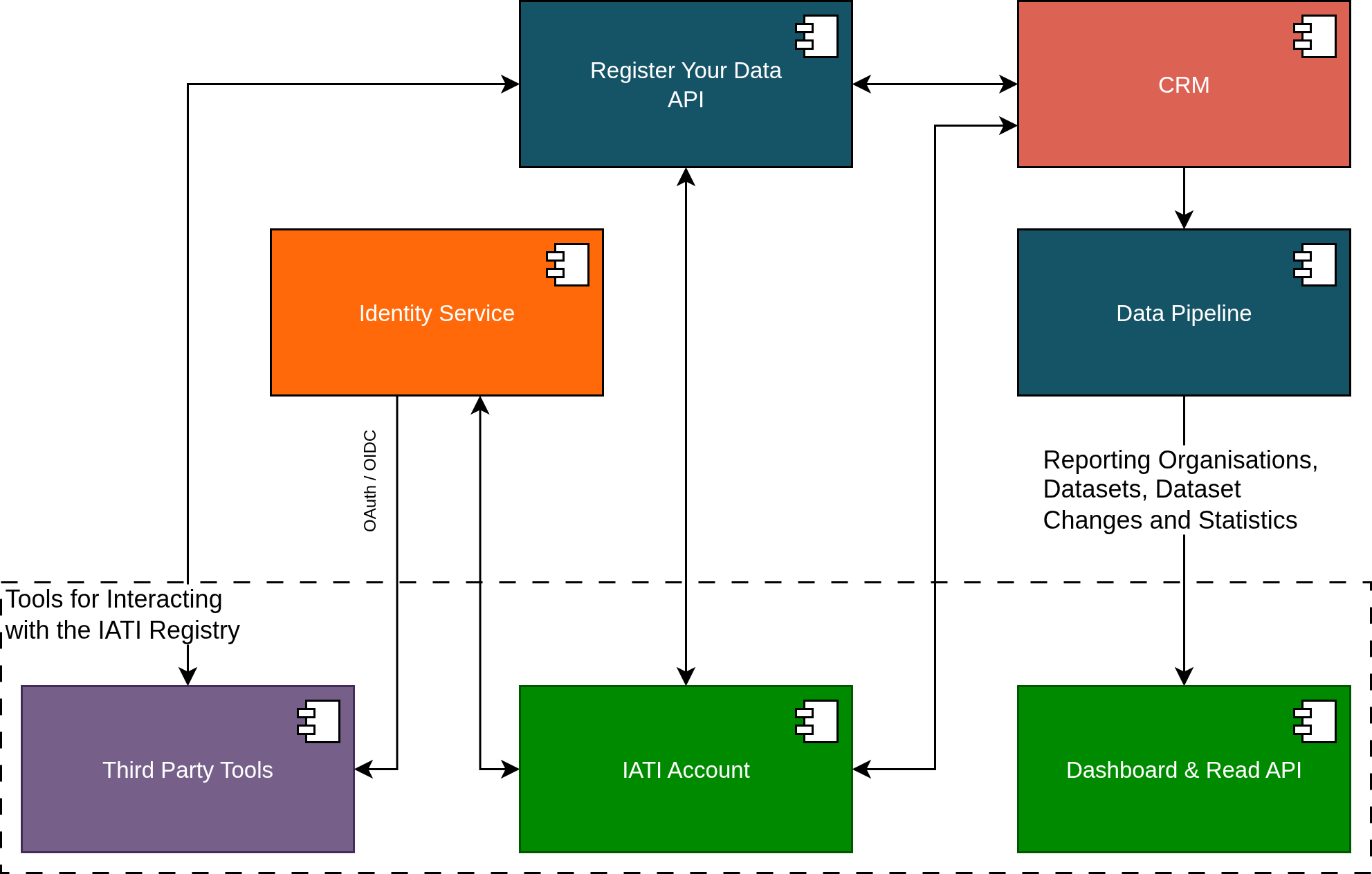
One of the key differences between the old CKAN-based IATI Registry and the new set-up is the use of Single Sign-On (SSO) as the method of authentication. This has been designed to simplify the user experience and enable a range of third party integrations with IATI infrastructure. However, to enable this enhanced functionality, applications will need to be refactored to facilitate SSO via our Identity Service. Although we emphasise SSO (via OpenID Connect) we will also support some limited OAuth2-based authentication.
OAuth2/OpenID Connect interactions with the Identity Service yield a short-lived access token that will be used to access an API for write access to the CRM. Details of how to use the access token are provided in the Register Your Data API specification. We intend to support three modes of connection:
Single Sign-On via OpenID Connect: in this mode clients will log users into their application using OpenID Connect and will obtain an access token that will permit access to the organisation(s) associated with that user. This will be available at launch.
Machine-to-machine applications: we will support connections using a Client Credentials OAuth2 grant. These connections are far more limited in terms of the organisations and calls that can be made to the API. We expect this to be available in Q3/Q4 2026.
Account linking: we eventually expect to support clients that want to retain their own login system but facilitate linking to an existing IATI account. We expect this to be available in Q4 2026.
Third party tool providers that would like to connect to IATI infrastructure cannot do this without being registered in advance with the IATI Secretariat. Through this registration process we will discuss your needs, setup your application in the Identity Service, supply you with credentials to use when making calls to the Identity Service, and provide developer support.
Nota
SSO is being rolled out across the IATI ecosystem and provides access for users to a range of services via a single user account. If your application logs in a user, that user will be logged into IATI and will also be able to access other tools. The converse is also true - that a user may arrive at your application having already logged into IATI through SSO in another tool. Applications should be designed to encounter these different scenarios and should support logout from IATI.
The Register Your Data API implements the same functionality as present in the previous CKAN-based Registry, but we have implemented additional per-application controls. As a result, the functionality available to third party tools is less permissive. In particular:
Third party applications are not able to create new reporting organisations in the CRM.
Applications using machine-to-machine OAuth2 connections are not be able to modify any user permissions or delete organisations.
CKAN moved from API keys to API tokens as a progression from more simplified application-level authentication to more specific user-centric authentication and authorisation. The development of the Registry replacement continues this progression and introduces individual authentication with short-lived, auto-expiring access tokens. Any functionality that relies on using an API key or API token generated in CKAN must be refactored to work with the new set-up. An access token contains no information about what organisation(s) a user is attached to. This information is only available via the Register Your Data API.
To call the Register Your Data API and write any changes to the CRM, a short-lived access token must be obtained from the IATI Identity Service (e.g. through single sign on (SSO)) and passed to the API. This should be passed to the API via the HTTP Authorization header with a Bearer parameter. It is entirely possible that the token will automatically expire between receiving the token from the identity server and an API call being made, so tools should be prepared to handle error messages from the API and refresh the access token. As explained above, applications that wish to obtain an access token to call the API must be registered in advance with the IATI Secretariat.
In CKAN, per organisation user permissions are controlled with the roles admin, editor, and member. In the replacement set-up, we have two levels of user permissions:
coarse access control that determines which endpoints an access token can reach.
fine-grained authorisation that determines which organisations and datasets can be changed, and what information can be changed via those endpoints.
Access control to call certain API endpoints are restricted using OAuth2 scopes. An application should request the scopes it requires as part of it’s OIDC/OAuth2 flow with the Identity Service. It is important to recognise that not all these scopes may be granted and so applications should should check these after the Identity Service flow has completed. If an API endpoint is called with an access token that does not have the required scopes, a 403 Forbidden HTTP response will be returned. The Register Your Data API specification lists the required scopes against each API endpoint.
Associated with this, a user with access to the Register Your Data API will have iati_register_your_data as a role in the OAuth2 claims obtained from the Identity Service userinfo endpoint.
Per organisation user permissions are controlled with a system of fine-grained authorisations that offers similar permission groups to CKAN. These control which organisations and datasets a user is able to access, and what changes they can make. Similar to CKAN, we group these into three roles that are roughly analogous to CKAN’s admin, editor and member:
admin: for organisation administrators.
editor: for organisation and dataset editors.
contributors: for data editors.
These can only be assigned to a user for a particular organisation via calls to the Register Your Data API by an organisation admin.
There is a fourth role (provider admin) that will be discussed in the provider admin section below.
The table below shows the fine-grained authorisations that these roles have:
| Authorisation |
Admin |
Editor |
Contributor |
Provider Admin |
|---|
read-org |
x |
x |
x |
x |
update-org |
x |
x |
|
x |
delete-org |
x |
|
|
|
set-org-user-authz |
x |
|
|
|
set-org-tool-authz |
x |
x |
|
|
read-dataset |
x |
x |
x |
x |
create-dataset |
x |
x |
x |
x |
update-dataset |
x |
x |
x |
x |
update-dataset-visibility |
x |
x |
|
x |
delete-dataset |
x |
x |
|
x |
Relative to an admin, an editor cannot:
Relative to an editor, a contributor cannot:
IATI Secretariat staff will have a superadmin authorisation where their access tokens afford them full access to any organisation and dataset. Superadmins can be identified by examining the role claim in the payload from the Identity Service userinfo endpoint and which should include iati_superadmin.
To support third parties in developing tools and supporting the community, we have implemented a system of enhanced permissions that we refer to as Provider Admin. Any third party tool can provide assistance to its users through some limited admin access to an organisation’s records. Eventually the authorisation for third party tools to access the records of a reporting organisation will be managed in IATI Account.
There are three components to the Provider Admin model:
A tool is a third party software application that is developed, maintained and offered by a provider. Such tools are built to work with Register Your Data. One provider may offer a number of tools to suit different business and user needs.
Reporting organisations can give provider admin permission for tool(s) to access and edit its records.
A user with an IATI Account can be attached to a tool and they then become an admin user of that tool. When logged into IATI infrastructure - and when the access token is scoped to include that tool, these admin users will have permissions to make changes to any reporting organisation that has given permission to that tool. Normally the access token scoping will be achieved by calling RYD with an access token that has been obtained by a call to the identity service from that tool. This means that a tool admin user cannot use provider admin permissions in a different tool.
By way of example:
A tool called «Aid Support Tool» is provided by «Aid Support Company». The IATI Secretariat add this information to Register Your Data.
A reporting organisation called «Aid Agency» gives permission for «Aid Support Tool» staff to update its dataset records.
A staff member, «Analyst», at «Aid Support Company» provides support for users of «Aid Support Tool». The IATI Secretariat add this staff member to the «Aid Support Tool» in Register Your Data.
When «Analyst» logs into «Aid Support Tool» they will be able to read the datasets of «Aid Agency» and update these records via Register Your Data.
These changes will be recorded as having being performed by «Aid Agency» (as «Aid Support Company» is providing support to «Aid Agency» under contract).
As «Analyst» has logged in via single-sign on, they could then log into another IATI tool, for example, IATI Account. However, «Analyst» will not have provider admin within IATI Account and so this functionality will not be available in that tool.
To setup a tool in Register Your Data and add/remove admin users please contact us.
There are some notable restrictions for provider admin:
An admin user for a tool cannot have an admin, editor or contributor role to access any reporting organisation. In these cases users should have separate accounts: one for admin user work within tools, and one for any work that involves being an admin, editor or contributor of reporting orgs.
A call to the /reporting-orgs endpoint in the Register Your Data API will not return a list of all the reporting orgs that the user has access to via provider admin. Tools can call the /users/{uid}/roles endpoint which will provide broad information on the permissions a user has: superadmin status, the tools for which the specified user is an admin user, and the reporting orgs and roles the user has for them. If the specified user is an admin user for a tool then this will only include provider_admin roles, otherwise, it will show regular roles.
Per-tool permissions are not currently supported but may be implemented in the future.
Eventually IATI Account will enable users to see which tools have been given provider admin permission, and to revoke and grant this permission. It will not enable reporting organisation users to see the names of admin users of tools.
Lists of users with reporting organisation roles (admin, editor or contributor) will not include tools.
There is nothing in the SSO model that prevents third party tools from having additional user data or user permissions to suit the functionality of the tool.
An example of this case might be that a tool wants to record the last dataset that a user was working on so that they can optionally return the user to that dataset upon login.
This functionality can be implemented by having a separate user database in the third party tool and where the user record in that database can be looked up using the sub unique identifier (or other unique information, such as a hash of the username) that is received from the Identity Service. It is important to recognise however, that any personal data about that user (for example, their name or working country) could be changed between logins by the user.
Some example use cases might be:
A tool that automatically generates XML files may want to add additional permissions such that some users can overwrite an existing XML file, and some cannot.
A tool that allows some users to edit dataset metadata for records that point to activity files, vs. organisation files.
These must be added on top of user permissions provided by the new Identity Service, and recorded separately in a similar fashion to additional user data. It is important to recognise that there is nothing to stop a user from logging into another tool and modifying data. For example, if you add permissions to restrict users from modifying the metadata for different categories of XML dataset record, a user can still log into other tools and modify the data.
These notes are aimed at providing guidance for migrating from the CKAN API to the new Register Your Data API by describing how equivalent operations are performed.
You call the GET /organization_list endpoint to obtain a list of publishers in CKAN, which allows you to fetch a list of all organisations. The equivalent in the Register Your Data API is GET /reporting-orgs, which will fetch a list of all reporting organisations to which the user has access. The endpoint will not return other reporting organisations. To achieve this you should make separate calls to the Dashboard API.
The details of a reporting organisation are available from the /reporting-orgs endpoint. If you wish to fetch organisation details, similar to the CKAN GET /organization_show endpoint, then you can call GET /reporting-orgs/{oid} where oid is the UUID for the organisation you want to fetch.
To create a new reporting organisation in CKAN you call the POST /organization_create endpoint. In the Register Your Data API, you must call POST /reporting-orgs. Note that access to this endpoint is more restricted than in the CKAN-based Registry. The access token must have the ryd:reporting_org:create OAuth scope, which will only be available to a small number of client applications.
To update a new reporting organisation in CKAN you either call the POST /organization_update or POST /organization_patch endpoints. The difference is that update will remove all fields not in the provided payload, and patch will replace fields that are provided. In the Register Your Data API, we only support updating organisation metadata using PATCH via the /reporting-orgs/{oid} endpoint, where oid is the UUID for the organisation you want to update.
To delete an organisation in CKAN you call POST /organization_delete. In the Register Your Data API, you must call DELETE /reporting-orgs/{oid} where oid is the UUID for the organisation you want to delete.
In CKAN, getting lists of datasets could be achieved with /package_list`, ``/package_search` and ``/organization_show with the include_datasets=true query string. This is now achieved with GET to /reporting-orgs/{oid}/datasets.
In CKAN, calls to POST /package_create will create a package and associated resource. In the Register Your Data API, this is achieved with POST /datasets/.
To delete a dataset in CKAN you call POST /package_delete endpoint. In the Register Your Data API, this is achieved with DELETE /datasets/{did}.
Your application wants to show a list of the reporting organisations your user has access to, perhaps with a little bit of metadata associated with them, such as name, number of published datasets, IATI organisation identifier. A call to GET /reporting-orgs/?include_meta=yes will fetch a list of reporting organisations with metadata on those organisations.
Then your application wants to allow a user to open a page for an organisation that shows a list of datasets. Calling the GET /reporting-orgs/{oid}/datasets endpoint will return a list of datasets for that organisation and all the metadata associated with each dataset.
Perhaps the user wants to update one of those datasets. A call to PATCH /datasets/{did} will update the dataset metadata and return the updated dataset metadata.
Perhaps then the user wants to change some user permissions in their organisation (assuming they are an organisation admin). GET /reporting-orgs/{oid}/users will get a list of users associated with an organisation and their roles. With a list of users your user might then change the role via an interface and you can make that change with a call to PUT /users/{uid}/reporting-org/{oid}.